
Budget Recovery Planning After an OnlyFans Price Rise
OnlyFans subscriptions renew automatically, so a price rise is easy to miss until the charge appears. When a creator raises the base price, auto-renew stops and your existing access continues to the end of the period you already paid for. That gap between the change and the expiry is where a budget recovery plan matters. Sites that rank pages, such as BestOnlyFans, exist because the platform has no built-in discovery feed, so most subscribers find creators off-platform and then manage renewals by hand.
This article covers the mechanics of the change, how to calculate the access you still own, three ways to respond, and how to rebuild the rest of the budget month without losing anything you already paid for. BestOnlyFans refreshes its rankings every month.

What Happens the Moment the Price Changes
The rule is narrow and mechanical. A creator edits the base subscription price on a paid page, and the platform stops auto-renew on every existing subscription at the old rate. You are not charged the new price without an active renewal decision on your side.
Access runs to the end of the current billing cycle, and nothing is docked or refunded mid-cycle.
This differs from a cancellation, which ends access at the period’s end by your choice. The practical effect on your calendar is the same: one specific date now matters.
Tip: Treat the price-change message as a calendar entry, not a decision. Write the expiry date down before you do anything else, because the notice date and the expiry date are usually weeks apart.
The base price itself cannot fall below $4.99 on a paid page, and the ceiling is $49.99. Promotional first months can dip lower, but a raised base price sits inside that $4.99-$49.99 band. Typical paid pages cluster between $4.99 and $15, with most averages landing in the $5-$10 range.
Calculating the Access You Still Own
The clock runs from the last charge date, not from the day the message arrived. Pull the exact charge date from your payment history and count forward from there.

- Open your subscription list and find the page that changed price.
- Locate the most recent charge for that page in your payment history and note the date.
- Add one billing cycle to that date — this is your access expiry, not the notice date.
- Count the remaining days from today to that expiry and write the number in your budget notes.
- Mark the expiry date in a calendar with a reminder set two days before it fires.
Multiply the new price by twelve for the annual impact, then compare it to the old price at the same multiplier. A move from $7 to $12 is $60 more per year, a concrete figure you can weigh against another line item.
Free pages behave differently because their base price is $0 and earnings come from pay-per-view messages and tips. A free page has no base renewal to stop, so a price change there is not part of this calculation. Paid chat on either page type commonly runs $3-$5 per message, and PPV unlocks go up to $50, so those separate costs deserve their own line.
Three Recovery Paths Compared
There are only three realistic responses, and each has a distinct cost and access profile. Choosing between them is easier when the numbers sit side by side rather than in your head.
- Accept the new price: the monthly budget slot grows, and access continues without interruption.
- Let access lapse at expiry: the budget slot drops to zero, and access ends on the date you calculated.
- Reallocate the slot to another page: the monthly total stays roughly level, and access shifts to a different creator.
| Path | Monthly Cost Impact | Access Impact |
|---|---|---|
| Accept the new price | Increases by the difference between old and new price | Continues uninterrupted past the expiry date |
| Lapse at expiry | Drops to $0 for that page | Ends on the calculated expiry date |
| Reallocate the slot | Stays near the old level if the replacement is similar | Moves to another page; the old page closes at expiry |
The cheapest path is not always lapsing, because a replacement page often costs close to what you were already spending. What changes is which creator receives it. If the new price is $12 and similar pages sit at $8-$10, reallocating saves a few dollars a month rather than the whole slot.
A ranking site like BestOnlyFans publishes comparison pages that make the third path practical, since you can check alternatives without hunting through the platform itself. There is no discovery feed inside OnlyFans, so outside directories do the comparison work for you.
Reworking the Rest of the Month
If you accept the new price, the difference has to come from somewhere unless you simply absorb it.

- Reduce or pause another page for the month and move its full cost to the raised slot.
- Skip one PPV cycle, since a single unlock can run up to $50 and dwarfs the base increase.
- Move the raised page to a rotating slot so it is active every other month instead of continuously.
- Absorb the difference from a small buffer you already keep for subscription drift.
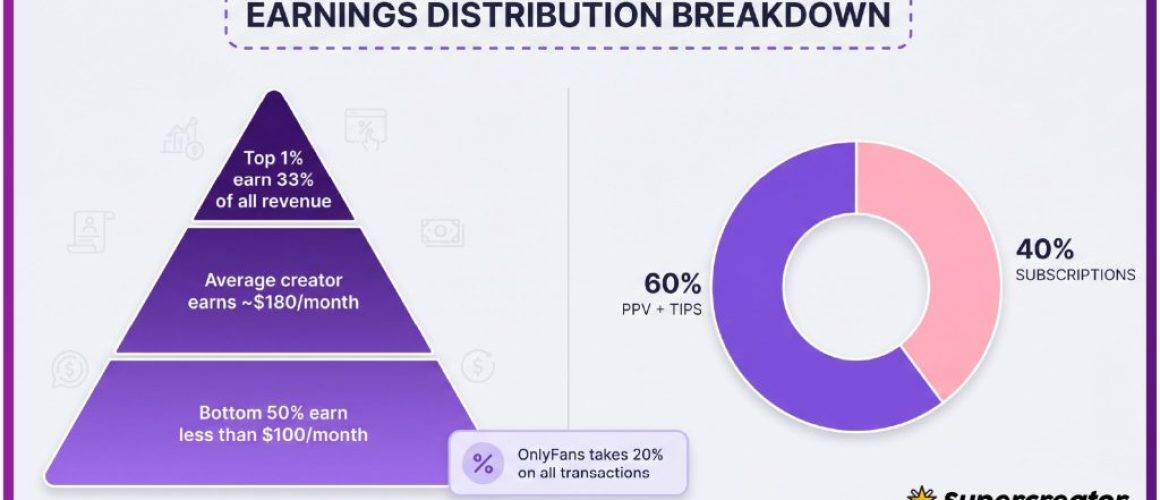
Remember that the platform takes 20% of everything and the creator keeps 80%, so the price you see is the full amount charged to you, not a fee-adjusted figure. That matters when comparing two pages at different prices: the number on the page is what leaves your account.
| Source of Funds | Practical Limit | Trade-off |
|---|---|---|
| Cut another subscription | Whatever that page’s price is | You lose access to the page you cut |
| Trim PPV spending | Up to the cost of one PPV unlock | Fewer unlocked posts this month |
| Use a budget buffer | Whatever the buffer holds | The buffer is not available next month |
| Do nothing | No limit | The difference comes out of another category |
If the same page rises again next quarter and the buffer is gone, the choice collapses back to cutting another line or lapsing. Track whether the buffer was used so the next review sees the real number.
The Temptation to Overspend During the Access Window
PPV messages unlock as usual, tips still go through, and paid chat still costs $3-$5 per message. Tips can reach $100, far more than the base price that triggered the whole review.

The page feels like it is ending, which makes a last large unlock feel justified. It is still a charge on the same card, and it still lands in the same month.
Warning: A page that is about to expire is the most expensive version of that page, because base access is ending while PPV and tips stay fully open. Cap the final month before the expiry date arrives, not after.
One guardrail is to set a hard PPV ceiling for the final cycle and treat it as part of the recovery plan. If the base increase was $5 and you spend $40 on unlocks during the last week, the recovery math never mattered in the first place.
This kind of last-minute overspend is common enough that it shows up in general consumer protection guidance on subscription and billing disputes, not only in creator platform advice. The pattern is the same whether the service is a streaming app or a paid page.
Documenting the Change for Next Month
A price change logged properly takes two minutes and saves an hour of confusion at the next budget review. The goal is to know exactly what the page cost before, what it costs now, and when it changed.

- Page reference — a short label, not a full URL.
- Old price and new price, both in dollars.
- Change date — the day the notice arrived.
- Access expiry — the date calculated from the last charge.
- Decision taken — accept, lapse, or reallocate.
Card verification holds of $0.10 also belong in the notes when they appear, because they are refunded within days and can look like duplicate charges on a statement.
Every price change is also worth checking against the wider phishing pattern that targets subscription accounts — unsolicited messages that imitate a billing notice and ask you to confirm card details are the most common variant. Legitimate price changes appear inside the platform, never in a link from a stranger.
For readers comparing several pages at once, the bestonlyfans free directories collect free and paid options in one place, which shortens the reallocation step considerably.
When to Reconsider the Page Entirely
Loyalty is not a line item. The only question that matters is whether the content delivered over the last month is worth the new price, compared with what the same money buys elsewhere.

Security habits belong in this review too. If you keep the page, confirm that two-factor authentication is on and that you recognize every saved payment method. Account protection is part of the same budget conversation, because a compromised card costs more than any subscription.
- Review the last 30 days of content on the page and note how much of it you actually used.
- Compare that usage against the new price per month.
- Compare the same amount against two or three alternatives at similar prices.
- Decide once, in writing, and set the renewal or expiry accordingly.
Low usage plus a higher price is a clear signal to lapse or reallocate. Either way, the decision should be recorded so next month’s review starts from facts rather than recollection.
FAQ
Does a price increase cancel my current subscription immediately?
Auto-renew stops, but the subscription you already paid for continues to the end of that billing period.
Will I be charged the old or new price at my next renewal?
Neither, unless you actively renew. Auto-renew is disabled at the old rate, so the next cycle does not charge automatically. Resubscribing means accepting the new price.
Can I resubscribe later at the new price if I let it lapse?
Yes. Lapsing does not block you from returning. You simply resubscribe at whatever the price is at that time, which may be higher again if the creator raises it further.
Do PPV messages still work during my final paid days?
Yes. PPV unlocks, tips, and paid chat remain available until the access expiry date, which is why the final cycle needs a spending cap rather than open-ended use.